
Best overall: Anki. Best for Japanese vocabulary tied to kanji: WaniKani. Best for knowledge-heavy study notes: RemNote. This 2026 guide compares the best vocabulary app with spaced repetition by review control, card creation, language coverage, and the work you must do before studying.
- Anki is the best vocabulary app with spaced repetition for learners who want control over their flashcards.
- WaniKani suits Japanese learners who want vocabulary organized around kanji study.
- Mochi suits Markdown-based flashcards; RemNote suits vocabulary connected to study notes.
- Lingua is best for Chinese-speaking learners who want English vocabulary, pronunciation, and conversational correction.
Why this matters
A vocabulary app can ask you to recognize a translation without teaching you to retrieve the word during conversation. Choose the review system for remembering words, then choose practice that makes you use them. These are related jobs, not interchangeable ones.
For Chinese-speaking English learners, Lingua combines vocabulary, grammar, pronunciation, and conversational correction through its Buddy chat/call feature. That makes it relevant to the application side of vocabulary learning; the dedicated spaced-repetition tools below address scheduled recall.
The right choice in 2026 depends less on collecting features than on accepting a particular workflow. Some apps provide a curriculum. Others provide the machinery and leave the vocabulary selection to you.
What makes the best vocabulary app with spaced repetition?
Judge each option against these criteria before choosing:
- Active recall: You should attempt an answer before revealing it, rather than merely reread a word.
- Review scheduling: The system should bring material back across separate study sessions, with scheduling informed by your responses.
- Card quality: Useful prompts make the intended meaning clear and avoid asking several unrelated questions at once.
- Language fit: A Japanese kanji curriculum and a personal English vocabulary deck solve different problems.
- Setup burden: Creating cards, checking examples, and correcting imported material all take effort.
- Transfer to use: Remembering a definition does not replace listening, pronunciation, or sentence production.
No app wins every criterion. A ready-made sequence reduces decisions but restricts what you study; an open-ended flashcard system offers control but makes you responsible for the material.
Best spaced-repetition vocabulary apps at a glance
| Rank and app | Best for | Standout feature | Key limitation |
|---|---|---|---|
| 1. Anki | Custom vocabulary decks | Flexible card templates and spaced-repetition reviews | You must create or evaluate your study material |
| 2. WaniKani | Japanese vocabulary through kanji | Structured radical, kanji, and vocabulary progression | Not a general-purpose vocabulary app for other languages |
| 3. RemNote | Vocabulary embedded in study notes | Flashcards connected to a knowledge base | More note structure than a simple word list needs |
| 4. Mochi | Markdown-based vocabulary cards | Markdown notes and spaced-repetition cards | You remain responsible for the learning sequence |
| 5. SuperMemo for Windows | Detailed control of long-term study | Spaced repetition and incremental reading | A specialized workflow with substantial learning overhead |
These rankings reflect different use cases, not measured learning outcomes. The first choice is the broadest recommendation; the remaining choices win when their particular workflow matches yours.
1. Anki: best vocabulary app for custom decks
Anki is a flashcard application with spaced-repetition scheduling and customizable card types. You can build cards around translations, sentence gaps, images, and audio rather than accept a single fixed exercise format.
Best for: Learners who want control over vocabulary selection and testing. Anki is the default 2026 recommendation when you already know which words matter to you, whether they come from reading, lessons, or work.
Anki pros:
- Customizable templates support different recall tasks.
- Audio and images can accompany vocabulary prompts.
- Shared decks provide starting material you can inspect and edit.
- Your vocabulary collection can reflect your actual reading and conversations.
Anki cons:
- Building clear cards requires preparation.
- Shared decks need checking for accuracy and relevance.
- Flashcard reviews do not provide a complete speaking curriculum.
Start with words you have encountered, not a large deck chosen only because it is large. A sentence with one missing target word usually gives you a clearer task than an isolated word with several possible translations.
Keep recognition and production separate. Understanding an English word when you see it is a different task from producing it from a meaning cue.
Verdict: Buy into Anki's workflow if customization matters more than guided lessons.
2. WaniKani: best vocabulary app for kanji-linked Japanese
WaniKani teaches Japanese radicals, kanji, and vocabulary through a structured sequence with spaced reviews. Its vocabulary study is connected to learning Japanese writing rather than to building an unrestricted multilingual word collection.
Best for: Japanese learners who want a defined kanji-centered path. Choose WaniKani when deciding what to learn next is the obstacle, not when you need to import a personal English vocabulary list.
WaniKani pros:
- A defined progression reduces curriculum planning.
- Vocabulary reinforces the kanji being studied.
- Mnemonics support the learning material.
- Scheduled reviews keep earlier material in the study cycle.
WaniKani cons:
- Its scope is Japanese, not general language learning.
- The sequence offers less freedom than a custom deck.
- Kanji and vocabulary study do not replace conversation practice.
The distinction matters: Japanese vocabulary includes more than identifying a character's meaning. You also need to connect written forms, readings, and usage. A structured system helps organize part of that work, but you should still meet the words in sentences outside the review queue.
Verdict: Buy into WaniKani's sequence for Japanese kanji study; skip it for English vocabulary.
3. RemNote: best vocabulary app for connected study notes
RemNote combines note-taking with flashcards and spaced repetition. Instead of keeping vocabulary in a separate collection, you can connect it to the lesson, reading notes, or subject where you encountered it.
Best for: Students learning terminology alongside course material. This is useful when the surrounding explanation matters as much as the word's translation.
RemNote pros:
- Flashcards can stay connected to their source notes.
- Nested notes help organize related concepts.
- Spaced repetition supports revisiting selected material.
- Vocabulary and subject knowledge can share a study workflow.
RemNote cons:
- Organizing notes adds work to simple vocabulary study.
- Long notes still need editing into answerable prompts.
- A connected knowledge base does not supply a language curriculum.
For example, a learner studying biology in English can keep a technical term beside the process it describes. The review prompt should still test one clear distinction, rather than require reciting the whole explanation.
Choose RemNote because you want your notes and recall practice together. Do not choose it merely to add structure to a small list that already works well as ordinary flashcards.
Verdict: Buy into RemNote for course-linked vocabulary; skip it if note organization is unwanted work.
4. Mochi: best vocabulary app for Markdown-based cards
Mochi combines Markdown-based notes and flashcards with spaced repetition. It suits learners who prefer writing and editing their own material in a text-centered workflow.
Best for: Learners who already like Markdown and want editable vocabulary cards. The attraction is the authoring approach, not a prescribed path through a language.
Mochi pros:
- Markdown provides a consistent way to format cards.
- Notes and flashcards can sit within the same workflow.
- Images and audio can support study material.
- Self-authored cards let you choose relevant vocabulary.
Mochi cons:
- You must select and organize the vocabulary yourself.
- Writing attractive notes does not guarantee useful recall prompts.
- It is not a substitute for guided conversation practice.
Keep formatting subordinate to the question. If a card contains a definition, several example sentences, and unrelated grammar notes, split the material until the required answer is obvious.
Mochi belongs on a 2026 shortlist when text-based authoring is a genuine preference. If Markdown itself is unfamiliar or distracting, it is not a reason to switch from a working study system.
Verdict: Buy into Mochi for Markdown-based study; skip it if you want a ready-made course.
5. SuperMemo for Windows: best for advanced study control
SuperMemo for Windows combines spaced repetition with tools including incremental reading. Incremental reading lets you work through source material in portions and develop selected information into review items.
Best for: Experienced self-directed learners studying vocabulary within substantial reading material. This is a specialized study environment, not the simplest introduction to daily word reviews.
SuperMemo for Windows pros:
- Spaced repetition supports long-term review.
- Incremental reading connects source material with study items.
- Detailed controls suit learners who want to manage their study process closely.
SuperMemo for Windows cons:
- Learning the workflow takes effort.
- The Windows product is platform-specific.
- Its complexity is unnecessary for a straightforward vocabulary list.
Choose it because incremental reading and detailed study management solve a real problem for you. Do not assume that a more elaborate system automatically produces better vocabulary cards.
Verdict: Hold unless you specifically want incremental reading and advanced study control.
Where Lingua fits alongside spaced repetition
Lingua is best for Chinese-speaking learners who want English vocabulary practice connected to pronunciation and conversational correction. Its stated scope includes grammar and the Buddy chat/call feature, plus Chinese and Japanese vocabulary courses.
That is a different selection question from choosing a flashcard scheduler. When your problem is using remembered English words, evaluate practice that requires sentences and conversation rather than adding more recognition cards.
Lingua vocabulary app pros:
- English vocabulary sits alongside grammar and pronunciation.
- Buddy provides conversational correction through chat and calls.
- The app primarily serves Chinese-speaking learners.
Limitations of a combined workflow:
- Maintaining a separate flashcard collection adds organizational work.
- Vocabulary recall and conversational use still need separate attention.
Choose one primary review collection. Transfer only words that matter to your conversations, rather than duplicating every exercise across apps.
Turn a vocabulary review into usable English
For your 2026 study routine, use this suggested starting plan—not a promised learning rate. Adjust the workload when reviews stop fitting your day.
- Select words: Choose 5 new words from something you read or heard. Keep the original context.
- Build prompts: Give each card a clear question and a checkable answer. Separate competing meanings.
- Review first: Reserve 10 minutes for due reviews before adding more material. Reduce new additions if reviews accumulate.
- Use aloud: Say 1 original sentence with each target word. Check whether the meaning fits your intended message.
- Repair cards: Rewrite prompts that repeatedly confuse you. A vague question needs editing, not just more repetitions.
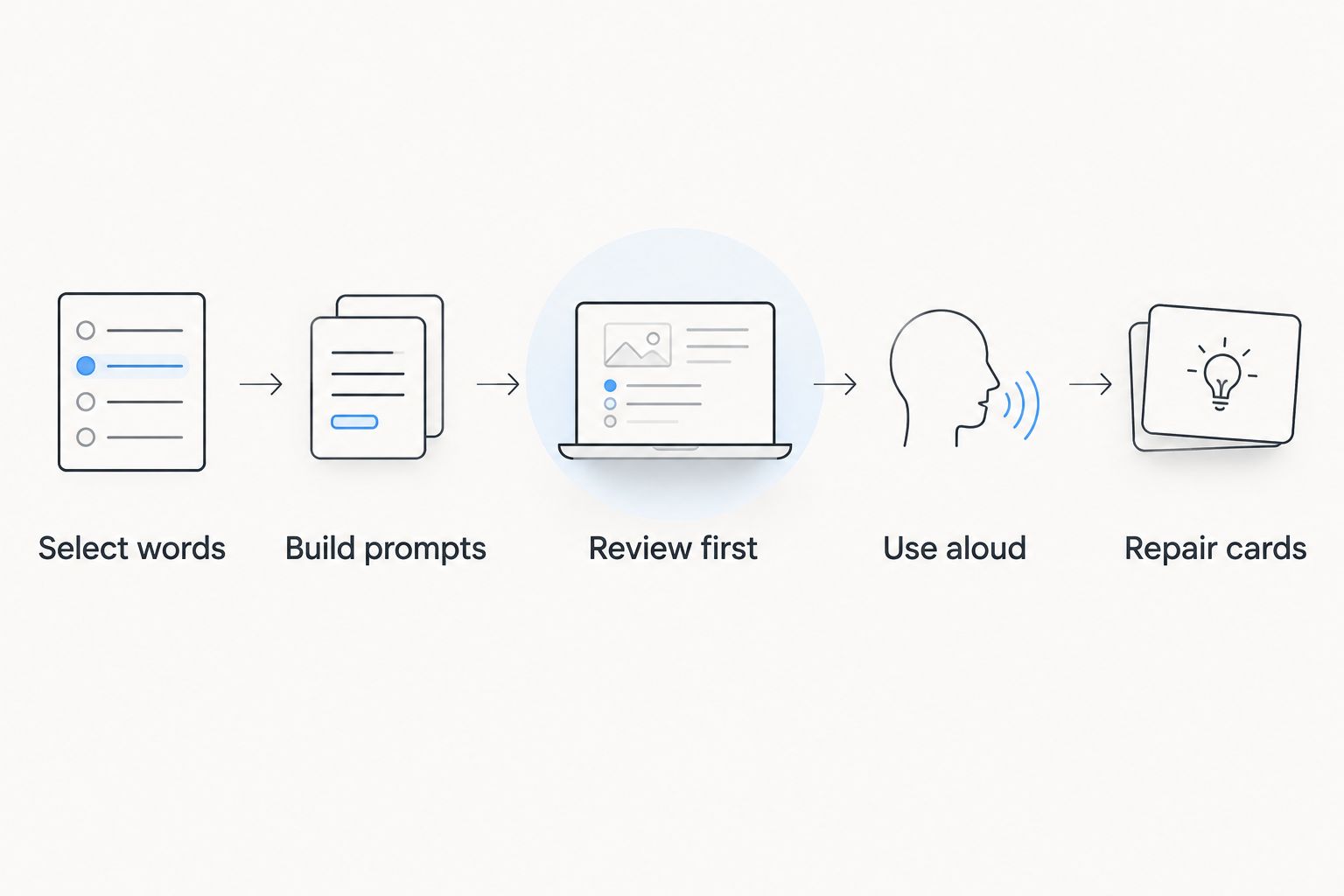
The workload should remain small enough that you can notice card problems. If you remember a translation but cannot use the word, add context or a production task instead of treating recognition as the finish line.
How the apps were ranked
The ranking prioritizes active recall, review scheduling, card flexibility, language fit, setup burden, and connection to real use. Anki takes the default position because its customizable cards address the broadest vocabulary-selection needs in this comparison.
The specialist choices answer narrower questions. WaniKani supplies a Japanese sequence; RemNote connects terminology to notes; Mochi emphasizes Markdown authoring; SuperMemo for Windows supports a more involved reading-and-review workflow.
Which vocabulary app should you choose?
Choose Anki if you are undecided. Build a small collection from words you actually encounter before committing to a large imported deck.
Choose WaniKani for kanji-linked Japanese study, RemNote for course terminology, Mochi for Markdown authoring, or SuperMemo for Windows for incremental reading. In 2026, the useful distinction remains the same: pick the system whose daily work you are willing to do.
FAQ
What's the best vocabulary app with spaced repetition?
Anki is the best default for learners who want customizable vocabulary flashcards. WaniKani is a more specific choice for Japanese vocabulary organized around kanji study.
Is Anki better than WaniKani for Japanese vocabulary?
Anki is better for selecting and customizing your own Japanese vocabulary; WaniKani is better for following a defined kanji-centered sequence. Choose based on whether you want curriculum control or a supplied progression.
Can spaced repetition make me fluent in English?
Spaced repetition alone does not provide all the skills involved in English fluency. Use it for recall alongside listening, pronunciation, reading, and conversation practice.
Which app connects vocabulary flashcards to study notes?
RemNote connects flashcards to study notes. It suits learners who want terminology reviewed alongside the subject material that explains it.
Is Lingua a useful companion to vocabulary flashcards?
Lingua is a relevant companion for Chinese-speaking English learners who want vocabulary, grammar, pronunciation, and conversational correction. Use a dedicated flashcard workflow for scheduled recall and language practice for applying words.
Should I download a large shared vocabulary deck?
Choose a shared deck only after checking its accuracy, relevance, and card format. A large collection adds little value if the prompts test words you do not need or meanings you cannot distinguish.
Why do I remember flashcards but forget words while speaking?
Recognizing a flashcard answer and producing a word in conversation are different tasks. Add meaning-to-word prompts and original spoken sentences so your practice includes retrieval without seeing the target word first.
One last thing
Repeatedly failing the same card is a reason to inspect the card. Check for an ambiguous translation, missing context, or several answers competing for the same prompt before increasing your study time.
A scheduler determines when a question returns. You still determine whether that question is worth answering.